Looking under the hood of a Chrome extension
In a recent conversation with a friend, I learned that there's a Chrome browser extension that purges Slack chat messages from the currently selected channel, and I got curious about its internals since Slack doesn't seem to offer this capability out of the box. In this article, I won't focus on the extension itself, but on the steps I took to figure out how it works, which can be helpful to understand runtime behaviours of web applications in general.
I created a brand new Slack org, a couple of test users, and populated a channel with messages from these test users, enough to generate a few scrollable pages. Then I installed and used the extension to start deleting messages.
Observing the behaviour
The first thing I noticed was that only the messages displayed on screen were deleted, and there was a delay of roughly 1 second between each deletion request. I also opened Chrome DevTools in the Network tab and found the request that was created for every deletion - screenshot below:
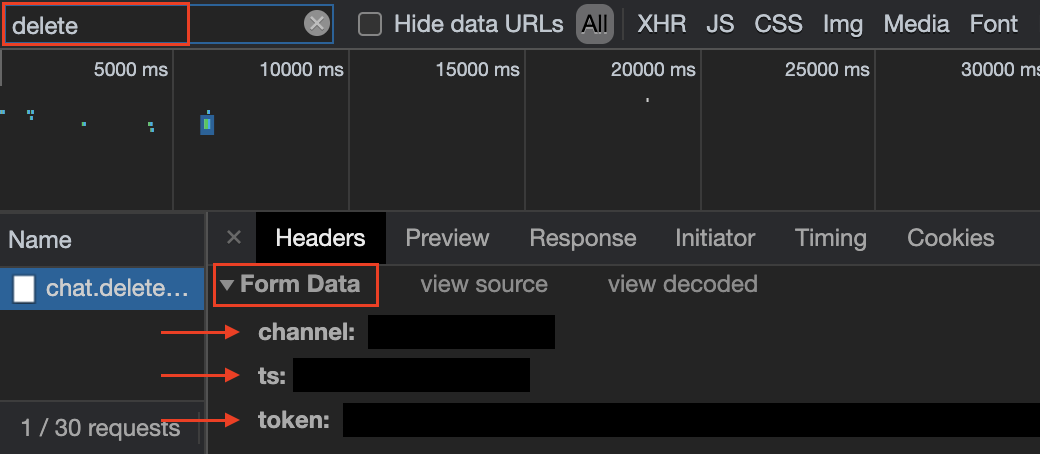
Slack sends a lot of requests constantly, so for me to pinpoint which one I was interested in, I tried to filter by anything that had the word "delete" in it, as you can see in the search bar of Chrome DevTools screenshot above. Then I proceeded to inspect the request's contents and found out that it's a regular POST with a "Form Data" payload, which means the data is passed as if it was a regular form being posted, not as a JSON object. From my initial assessment, it looked like channel, ts and token were the important fields, the first pointing to the ID of the channel I was in, the second to the timestamp of the message being deleted and the third to an authentication token.
The request had a token in its payload, and considering that most modern web applications send authentication tokens in an authorization header, I went to confirm whether the request had an actual authorization header. It didn't, which led me to believe Slack used a custom authentication mechanism.
I googled Slack chat.delete and found the API documentation, which confirmed my assumptions regarding the authentication mechanism used in their API and gave me another important piece of information: Slack API requests are rate limited, meaning you can't just send a burst of requests or Slack will start blocking them. This explained the ~1 second delay between deletion requests - the extension was intentionally throttling itself to avoid hitting the rate limit. While effective, this approach felt overly conservative; a more optimized solution would only delay requests after the rate limit was actually reached.
The next piece of the puzzle was the scrolling behaviour. I knew that once all messages on the screen were deleted, you had to scroll the page for the extension to process the next batch. The extension also took ~1 second to detect the new messages - it looked like the code was scheduling the check for new messages through a setInterval or setTimeout and continuously querying the DOM for the message nodes. To validate this assumption, I needed to intercept the DOM queries and check what was being returned.
To do this, I opened Chrome DevTools, navigated to the Console tab, and pasted the following code. It's important to run this before triggering the extension, so it picks up the patched functions:
// storing the original implementations
globalThis.originalQuerySelector = document.querySelector;
globalThis.originalQuerySelectorAll = document.querySelectorAll;

// wraps the object in a Proxy to monitor the property reads
function observe(someObject) {
  const handler = {
    get: (target, prop, receiver) => {
      console.log(target, `Reading property: [${prop}]`);

      // use `Reflect.get` to return the actual property value
      return Reflect.get(target, prop, receiver);
    }
  };

  return new Proxy(someObject, handler);
}

document.querySelector = (selector) => {
  console.log(`Searching for a single element with the selector [${selector}]`);

  const result = originalQuerySelector.call(document, ...arguments);
  if (result) {
    return observe(result);
  }

  return result;
};

document.querySelectorAll = (selector) => {
  console.log(`Searching for multiple elements with the selector [${selector}]`);

  const result = originalQuerySelectorAll.call(document, ...arguments);
  if (result) {
    return Array.from(result).map(item => observe(item));
  }

  return result;
};
The core concept here is monkey patching - replacing built-in functions like document.querySelector and document.querySelectorAll with custom implementations at runtime. These custom functions intercept the calls, log the selectors being used, invoke the original implementations, and wrap the results in Proxy instances before returning them. The proxied objects log every property access while behaving identically to the originals, letting me observe the extension's behaviour without breaking it.
Wrapping up
There are many ways to investigate how web applications behave at runtime. For example, you could find the minified source code in the Network inspector, use the browser's "Pretty print" feature to make it readable, set breakpoints, and trace execution from there. The more techniques you have in your toolbox, the better equipped you'll be when facing unfamiliar code. What I find particularly valuable about monkey patching and Proxy-based observation is that they let you understand behaviour from the outside in, without needing to navigate through layers of minified or obfuscated code. This makes them especially useful when dealing with third-party code outside of your control or poorly documented applications with erratic behaviour.